
Send survey responses by webhook and API
When a CRM, a ticketing system or a panel dashboard needs to know right away that a survey was answered, you don’t have to wait for an export. Since DataLion 2026.3.201 every survey reports its responses in two ways:
- Webhooks: DataLion sends each new response as a signed POST request to an address you choose.
- REST API: your system fetches responses page by page, whenever it wants.
You set up both under Survey settings → Webhooks & API.
Requirements
- DataLion release 2026.3.201 or later, and administrator rights.
- A plan with API access. Otherwise the tab only shows “Webhooks and the response API are part of plans with API access.” The Free plan has no API access.
- For webhooks: a publicly reachable https address that accepts POST requests.
Set up a webhook
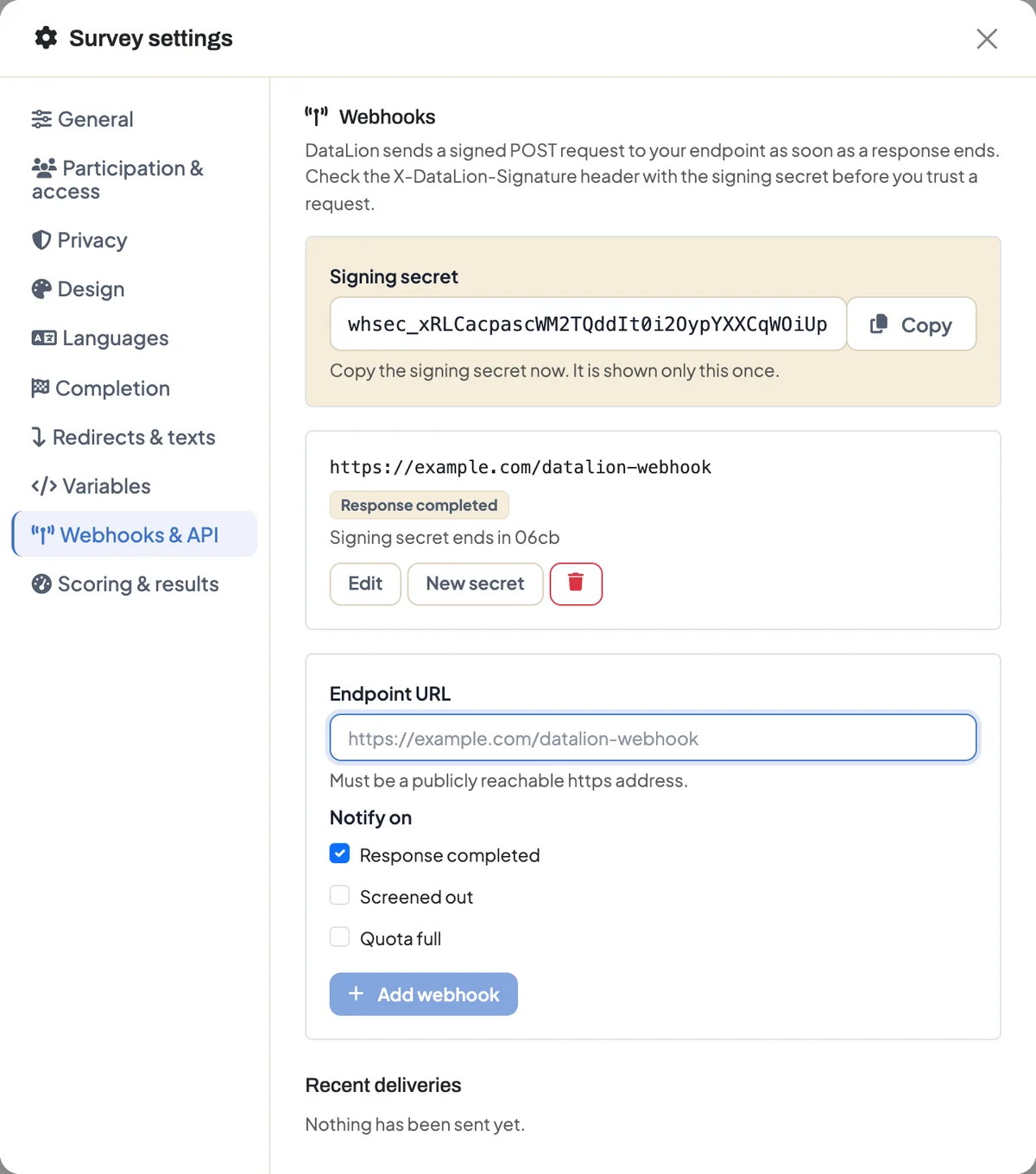
- Open the survey under Admin → Surveys and click the gear Survey settings at the top.
- Switch to the Webhooks & API tab.
- Enter your system’s address under Endpoint URL. It must start with
https://. - Under Notify on, tick the events:
- Response completed (
response.completed), - Screened out (
response.screened_out), - Quota full (
response.quota_full).
- Response completed (
- Click Add webhook.
- Copy the Signing secret (it starts with
whsec_). DataLion shows it only this once.
Each survey can have up to five webhooks. Edit changes the address and events or pauses a webhook with the Active switch. New secret creates a new signing secret, and the old one stops working immediately, so coordinate the switch with your receiving system. The trash icon deletes the webhook together with its delivery log.
What DataLion sends
Each delivery is a POST request with a JSON body and these headers:
X-DataLion-Event: the event, such asresponse.completed,X-DataLion-Delivery: a unique delivery ID,X-DataLion-Signature:t=<Unix time>,v1=<signature>.
The body holds the delivery ID, the event, the survey (ID and title) and the response: status, language, start and end time, the answers as {code: value}, computed variables and scores. For personalised surveys, respondent carries the participant token, the email address and any embedded parameters; for anonymous surveys it is null. DataLion never sends the hashed IP address, and it never sends responses you removed in the quality review.
Verify the signature
Check every request before your system trusts it. The signature is an HMAC-SHA256 over <t>.<raw body>, computed with the full signing secret including whsec_. Use the body exactly as it arrived, not re-serialised JSON.
Example in Node.js:
const crypto = require('crypto');

function isValid(signatureHeader, rawBody, secret) {
  const [t, v1] = signatureHeader.split(',').map((part) => part.split('=')[1]);
  const expected = crypto.createHmac('sha256', secret).update(`${t}.${rawBody}`).digest('hex');
  const fresh = Math.abs(Date.now() / 1000 - Number(t)) < 300;
  return fresh && crypto.timingSafeEqual(Buffer.from(expected), Buffer.from(v1));
}
The same delivery can arrive more than once or out of order. Spot duplicates by X-DataLion-Delivery or by the id field in the body.
Retries and delivery log
Any server reply other than a 2xx status counts as a failure, including a redirect or a timeout after 10 seconds. DataLion then retries after 1 minute, 5 minutes, 30 minutes and 2 hours, five attempts in total. After that the delivery is marked Failed.
Recent deliveries lists the last 20 deliveries of all webhooks of the survey with Time, Event, Status (Queued, Retrying, Delivered, Failed), the Answer from your server (such as “HTTP 200” or the error message) and the number of Attempts. The log refreshes when you reopen the dialog. DataLion doesn’t store the delivery payloads.
There is no test-delivery button. To try it out, complete a response, for example through Test survey, and then check the log.
Fetch responses through the REST API
Instead of receiving responses, your system can also fetch them:
GET /api/v1/surveys/{survey-id}/responses
GET /api/v1/surveys/{survey-id}/responses/{response-id}
The list takes these parameters:
status:partial,complete,screened_outorquota_full,completed_fromandcompleted_to: a date or a timestamp. A plain date includes the whole day.per_page(1 to 200, default 50) andpage.
The reply holds the records and, under meta, the current page, page size, last page and total. 120 requests per minute are allowed. Fields and examples are in the API documentation at /docs on your instance.
The right token
The response API needs an administrator’s token with the survey-responses.read ability (or the general read ability). Because it returns data on individual respondents, none of the purposes under Admin → Integrations → API access includes that ability, so a token from there gets a 403 reply. Create the token through the API instead: POST /api/v1/users/{user}/tokens with "abilities": ["survey-responses.read"]. The token you send that request with needs the token-management ability. If in doubt, ask your DataLion contact.