
Design & whitelabel
Your survey — in your own look
Pick from 18 ready-made design templates or build your own look with the design builder — accent, background, card and text colors included. With whitelabel, you remove DataLion branding per survey.
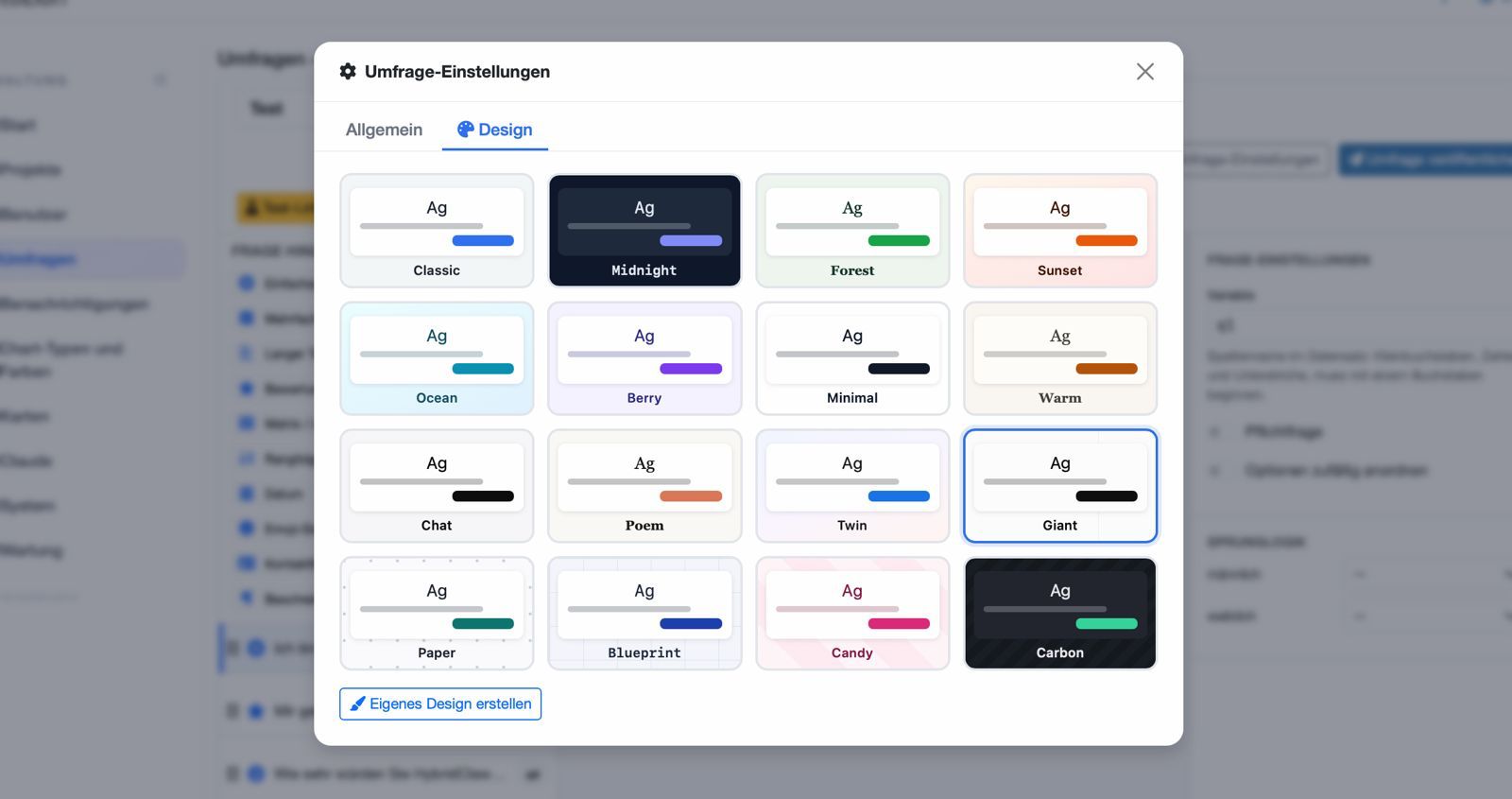
DataLion ships 18 ready-made design templates (Classic, Connections, Midnight, Forest, Ocean, Berry, Warm, Carbon …) plus a design builder that lets you set colors, header and footer bars, card and button shapes, font size and your own webfont yourself. Whitelabel removes DataLion branding per survey, so the questionnaire appears entirely in your own brand look.
- 🇩🇪 Made in Munich
- GDPR-compliant
- DPA included
- Hosted in Germany
- 🌐 Interface in EN, DE, FR, ES, IT & NL
Trusted by research institutes, brands & insights teams





- 50+ interactive chart types
- 20+ statistical methods
- SPSS · Excel · CSV import without data loss
- ISO 27001 certified data centers (Germany)
18 ready-made design templates
Want to start fast? 18 ready-made templates — including Classic, Connections, Midnight, Forest, Ocean, Berry, Warm and Carbon — give your survey a coherent look in one click. From light and understated to dark and bold, it is all there.
Every template is built for good readability and low drop-off — on small screens too.
- 18 templates in one click
- Light and dark themes (Classic, Connections, Midnight, Forest, Ocean, Berry, Warm, Carbon …)
- Optimized for readability and mobile use
Design builder for colors, shapes and type
Need it to be exactly your CI? The design builder lets you set accent, background, card and text colors freely — for a survey that feels like a native part of your brand.
Under Survey → Settings → Design → Create your own design you also shape the frame: a header bar with your logo and a text that can take URL parameters such as a participant number, a footer with your own links, card and button shapes, content width, base font size and your own webfont (WOFF or WOFF2).
That way the questionnaire fits your campaign, website and corporate design, instead of looking like a stock tool.
- Accent color for buttons and interactions
- Background and card colors for the stage
- Text color for optimal readability
- Header bar with piped text, footer with your own links
- Card and button shapes, content width, font size, own webfont
- Consistent with campaign and corporate design
Whitelabel — per survey
Often decisive for institutes, agencies and brands: with whitelabel you remove DataLion branding per survey. Respondents see only your look — ideal when the study runs under your or your client’s name.
Combined with your own colors and the mobile-first survey runner, the survey feels all of a piece — with no visible third-party tool.
- Remove DataLion branding per survey
- Entirely in your own or your client’s look
- Ideal for institutes, agencies and brands
See DataLion with your own data
Start free with your own raw data. Or book a personal demo of the path to a finished dashboard.
What users say about DataLion
- via G2
The embedding function allows us to generate insights of our data for our audience and customers by far less than half of the usual time needed before.
Verified user · Leisure, Travel & Tourism - via G2
User-friendliness, especially for market research topics. Structured backend with many customization options.
Verified user · Market Research - via G2
The contacts at DataLion are very committed. If you have problems, you can count on help. DataLion reacts quickly to requests for new functions.
Robert Q. · Managing Director - via G2
Very professional company, attentive to the customer needs, provider of a great software and service.
Generoso M. · CRM Analyst, Automotive

We now work much more efficiently, giving us more time to take care of the derivations and insights from the data for the customers.
More survey features
Guides in the help center
Common questions about design & whitelabel
Can I design surveys in my own brand look?
How many design templates are there?
What does whitelabel mean for DataLion surveys?
What can I customize in the design builder?
Do the surveys look good on a smartphone?
How do date questions look?
Design your survey in your own look
Try DataLion free: pick a template, adjust the colors and remove branding with whitelabel. Or book a personal demo.