
Collect sample through Cint
If you buy respondents through Cint, you used to build entry and return links by hand and pass the respondent ID through yourself. Since DataLion 2026.3.201 there is a preset for that: one switch creates the entry link, stores the Cint respondent ID, accepts each ID only once and returns respondents to Cint with the right status.
Requirements
- DataLion release 2026.3.201 or later, and administrator rights.
- A Cint project where you can enter the survey’s live link.
- A personalised survey. The preset is disabled for anonymous surveys, because the respondent ID links every response to a panel member. If you switch a survey to anonymous later, DataLion turns Cint off.
Set up Cint
Set up Cint while the survey is still a draft. Only then does DataLion create the variable for the respondent ID automatically.
- Open the survey under Admin → Surveys and switch to the Collect tab, Share section.
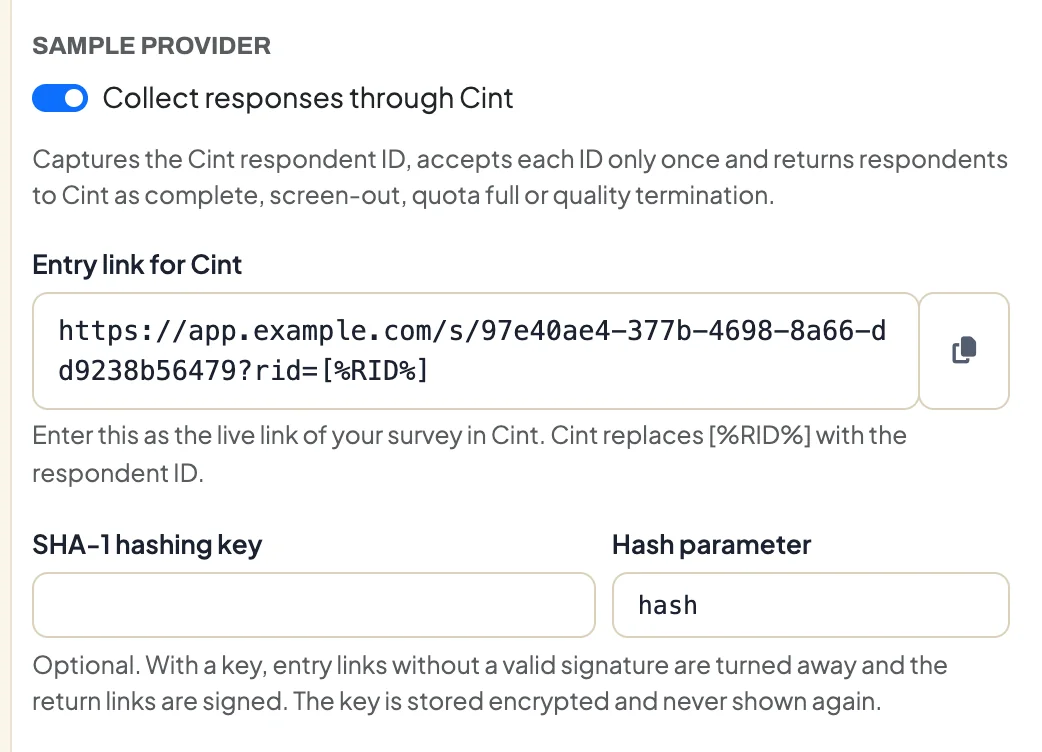
- Under Sample provider, switch on Collect responses through Cint. The setting saves immediately.
- Copy the Entry link for Cint and enter it in Cint as the live link of your survey. It ends in
?rid=[%RID%]. Cint replaces[%RID%]with the respondent ID. - Optional: paste the key from your Cint project under SHA-1 hashing key. Hash parameter names the parameter that carries the signature,
hashby default.
The key is stored encrypted and never shown again. The field then only says “A key is stored.” Remove key deletes it; entering a new one replaces it.
What DataLion handles from then on
- Storing the respondent ID:
ridis listed under Survey settings → Privacy → Capture URL parameters and ends up as its own column in the dataset. - Each ID once: a Cint ID is accepted once per survey. If someone comes back with the same ID after finishing, DataLion returns them to Cint with their earlier outcome.
- Returns with status: at the end, DataLion sends respondents back to Cint as complete, screen-out or quota full. A missing or invalid signature, an ID that was already used or the duplicate protection leads to a quality termination.
- Signed links: with a key stored, DataLion signs the return links and turns away entry links without a valid signature. The signature must be the last parameter in the link.
Respondents without rid in the link take the survey as usual and follow your own redirects under Survey settings → Redirects & texts.
Good to know
- Once the survey is closed, Cint respondents also see the closed-survey page and are not returned. Close the survey only after Cint has ended fieldwork.
- If you switched Cint on after publishing, the
ridcolumn is missing from the dataset. Returns still work. - How to spot speeders, bots and duplicates in panel sample is covered in Check the data quality of a survey.