
Export
Google Slides export — native decks in your Drive
Export dashboards, reports and single charts as live, editable Google Slides decks — straight into your connected Google Drive. Charts arrive as native Google Sheets charts in your colors, tables and KPIs as real Slides objects — all still editable in Slides.
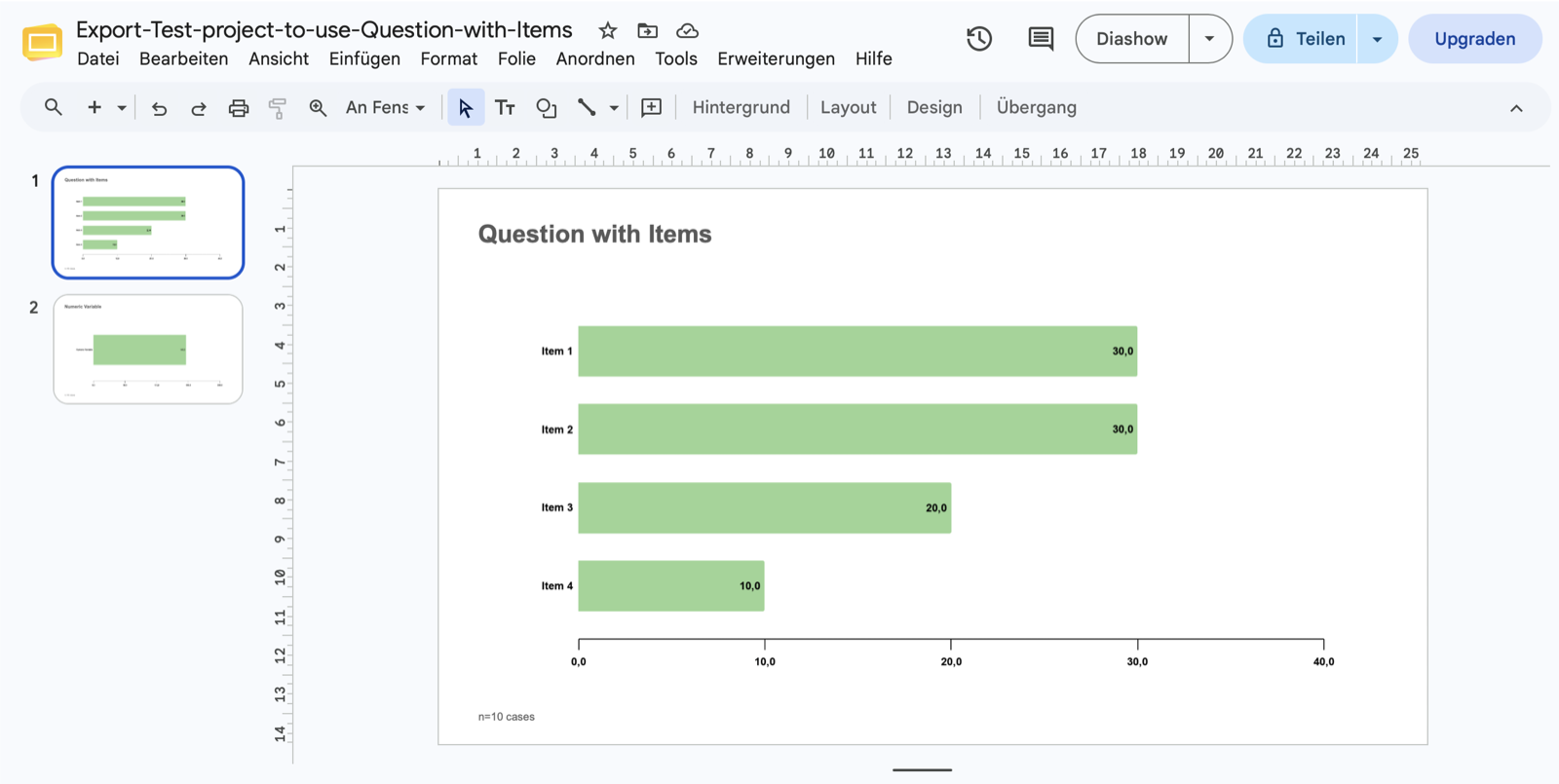
DataLion exports dashboards, reports and single charts as live, editable Google Slides decks straight into your connected Google Drive. Chart data lands in a companion Google Sheet and is embedded as native, editable Google Sheets charts in your DataLion colors, with titles, legends, value labels and number formats. Tables and KPI widgets become native Slides tables and number slides, and an optional Slides template skins the whole deck.
- 🇩🇪 Made in Munich
- GDPR-compliant
- DPA included
- Hosted in Germany
- 🌐 Interface in EN, DE, FR, ES, IT & NL
Trusted by research institutes, brands & insights teams






- 50+ interactive chart types
- 20+ statistical methods
- SPSS · Excel · CSV import without data loss
- ISO 27001 certified data centers (Germany)
Google Workspace teams paste screenshots into Slides
- Charts go in as images — every number correction means re-exporting and re-pasting.
- Teams living in Google Workspace have to detour through PowerPoint instead of presenting in Slides directly.
- Colors, titles and number formats drift from the original dashboard slide by slide.
Real Google Slides slides — not a flat image
DataLion turns your dashboard into a live, editable Google Slides deck — not a PNG, not a frozen graphic. Charts, tables and metrics stay real Slides objects you move, recolor or relabel directly in Google Slides.
The deck then sits in your Google Drive — shareable, commentable and co-editable like any other Slides presentation.
- A live, editable Slides deck instead of a screenshot pile
- Charts, tables and text as real slide elements
- Lands straight in the connected Google Drive — share and comment
Charts as native Google Sheets charts
The data behind each chart lands in a companion Google Sheet and is embedded as native, editable Google Sheets charts on the slide. Change a number in the Sheet and the chart on the slide follows.
Your DataLion colors, titles, legends, value labels and number formats come along, so the chart on the slide looks like it does in the dashboard — just in Google.
- Chart data in a companion Google Sheet
- Embedded as native, editable Sheets charts
- DataLion colors, titles, legends, value labels and number formats preserved
Tables and KPIs as real Slides objects
Not just charts: tables become native Google Slides tables and KPI widgets become clean number slides. They stay editable in Slides too — no flat images.
So you export a whole dashboard or report in one pass — charts, tables and metrics in the same deck.
- Tables as native Google Slides tables
- KPI widgets as their own number slides
- Export a whole dashboard or report at once
Optional Slides template across the whole deck
Store a Google Slides template and the export applies your layout across the entire deck — title slide, master, fonts and placement included. Every presentation looks like it came from one hand.
Delivery runs through the instance service account: an admin shares the Drive folder once with the shown service-account address — then you export dashboards, reports or single charts in a click.
- Optional Slides template skins the whole deck
- Delivery via the instance service account (no per-user OAuth)
- Dashboards, reports or single charts, all exportable
One click further: PowerPoint, Excel, PDF
Google Slides is the new target for Workspace teams — but not the only one. Export the same content as natively editable PowerPoint, as flexible Excel report books, as PDF, or as high-resolution PNG/JPEG.
Once set up, dashboards and reports refresh automatically — wave after wave, in the same layout.
See DataLion with your own data
Start free with your own raw data. Or book a personal demo of the path to a finished dashboard.
What users say about DataLion
- via G2
The embedding function allows us to generate insights of our data for our audience and customers by far less than half of the usual time needed before.
Verified user · Leisure, Travel & Tourism - via G2
User-friendliness, especially for market research topics. Structured backend with many customization options.
Verified user · Market Research - via G2
The contacts at DataLion are very committed. If you have problems, you can count on help. DataLion reacts quickly to requests for new functions.
Robert Q. · Managing Director - via G2
Very professional company, attentive to the customer needs, provider of a great software and service.
Generoso M. · CRM Analyst, Automotive

We now work much more efficiently, giving us more time to take care of the derivations and insights from the data for the customers.
More export features
Common questions about Google Slides export
Are the slides editable in Google Slides, or just images?
Where does the deck get exported to?
Are my DataLion colors and number formats preserved?
Can I use my own Slides layout?
Can I export single charts instead of whole dashboards?
Export your dashboard to Google Slides
Try DataLion free — or get a demo of how your dashboard becomes a live, editable Google Slides deck in your Drive.