
Handling missing values
Missing values change results more than you might expect. Some missing values you want to see in your analyses, others you don’t. Some should count toward the base for percentages, others should be excluded. In DataLion you set this for the whole project and can override it for individual questions in the codebook and for individual charts.
The most specific setting wins: a chart overrides the codebook, and the codebook overrides the project.
Requirements
- An account with access to the project settings.
- Showing missing values as their own category is available from DataLion 2026.2.195.
Settings for the whole project
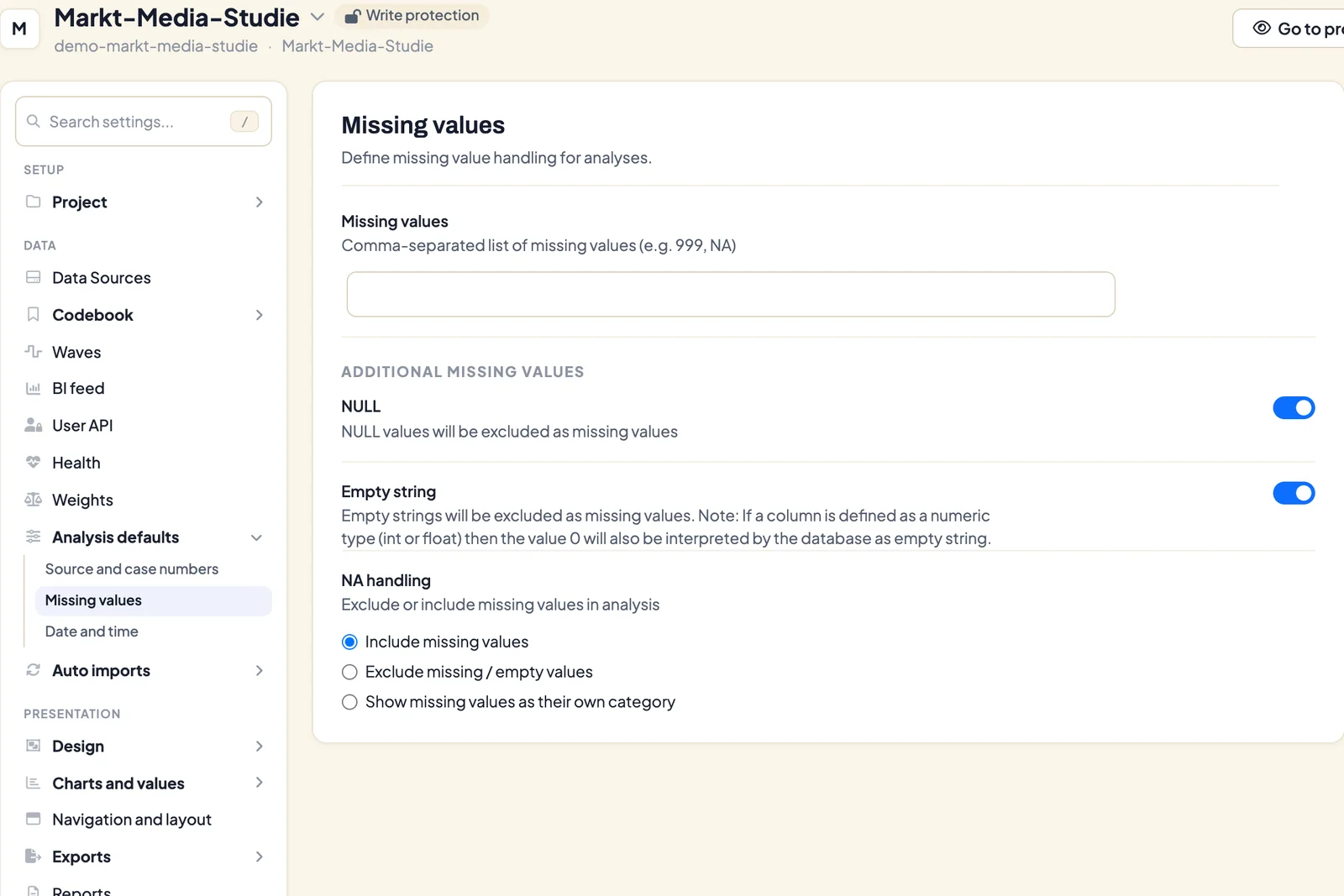
Open the project under Admin → Projects and choose Missing values under Analysis defaults in the navigation.
- Missing values: a comma-separated list of values that count as missing, such as
99, 999, NA. - NULL: NULL values in the database count as missing.
- Empty string: empty entries count as missing. Note: in columns with a numeric type (int or float), the database also treats the value 0 as an empty string.
- NA handling: what happens to missing values in calculations
- Include missing values (default): they count toward the base.
- Exclude missing / empty values: they drop out of the base.
- Show missing values as their own category: they appear as a separate bar, see below.
Save the section with Save.
Example
If “99” is defined as a missing value and excluded from calculations, DataLion
- ignores all entries of “99” for sums and means,
- calculates percentages only on the values that aren’t “99”.
Filter questions as a typical case
Filter questions in a questionnaire are a typical case. Only people who know a product rate their satisfaction with it. Anyone who doesn’t know it has a missing value for satisfaction.
- To learn how satisfied the people who know the product are, exclude the missing values.
- To learn how many of all respondents are satisfied with the product, include the missing values in the percentage base.
Example with means
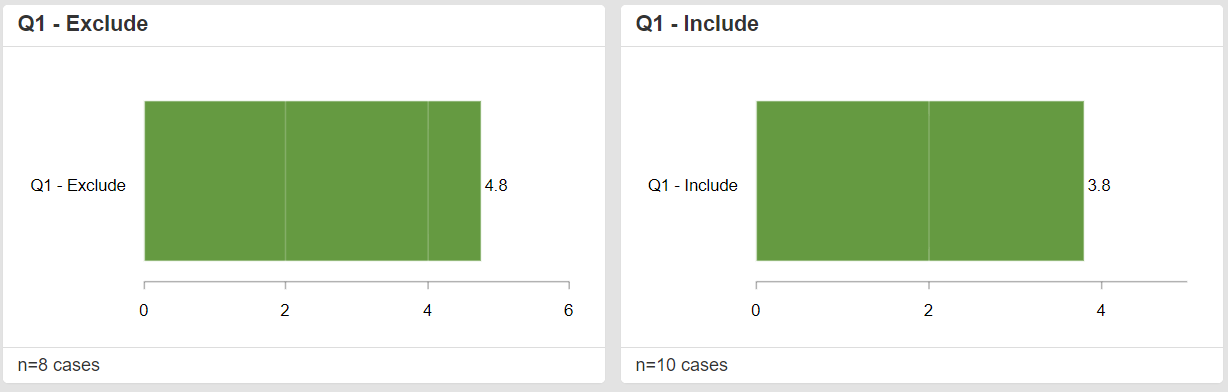
-
Missing values for Q1 are coded as 0. If 0 enters the calculation, the mean is biased downward and the case count is higher.
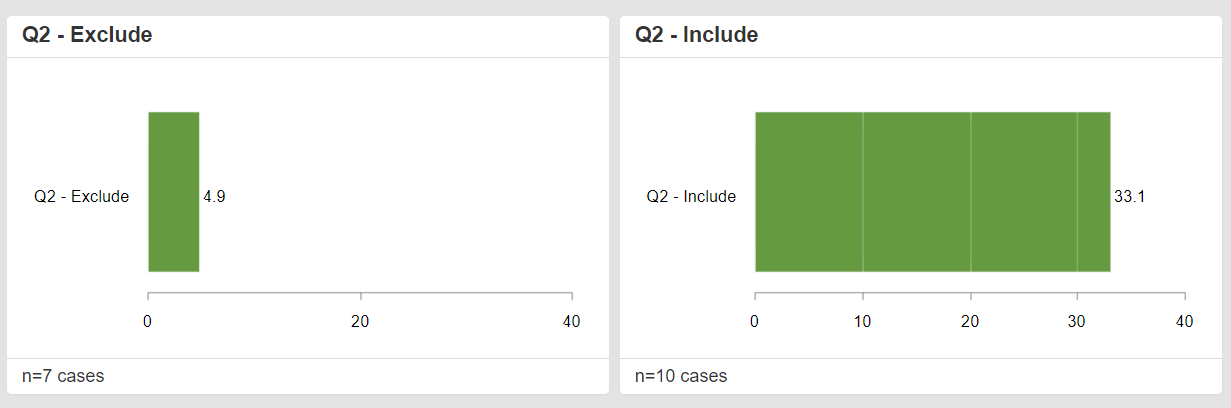
-
Missing values for Q2 are coded as 99. If 99 enters the calculation by mistake, the mean is biased upward and the case count is higher.
Example with percentages
Missing values for Q2 are coded as 99. If you exclude 99, the case count is lower (only those who know the product) and the percentage is higher. If you include 99, the case count is higher (all respondents) and the percentage is lower.

Show missing values as their own category
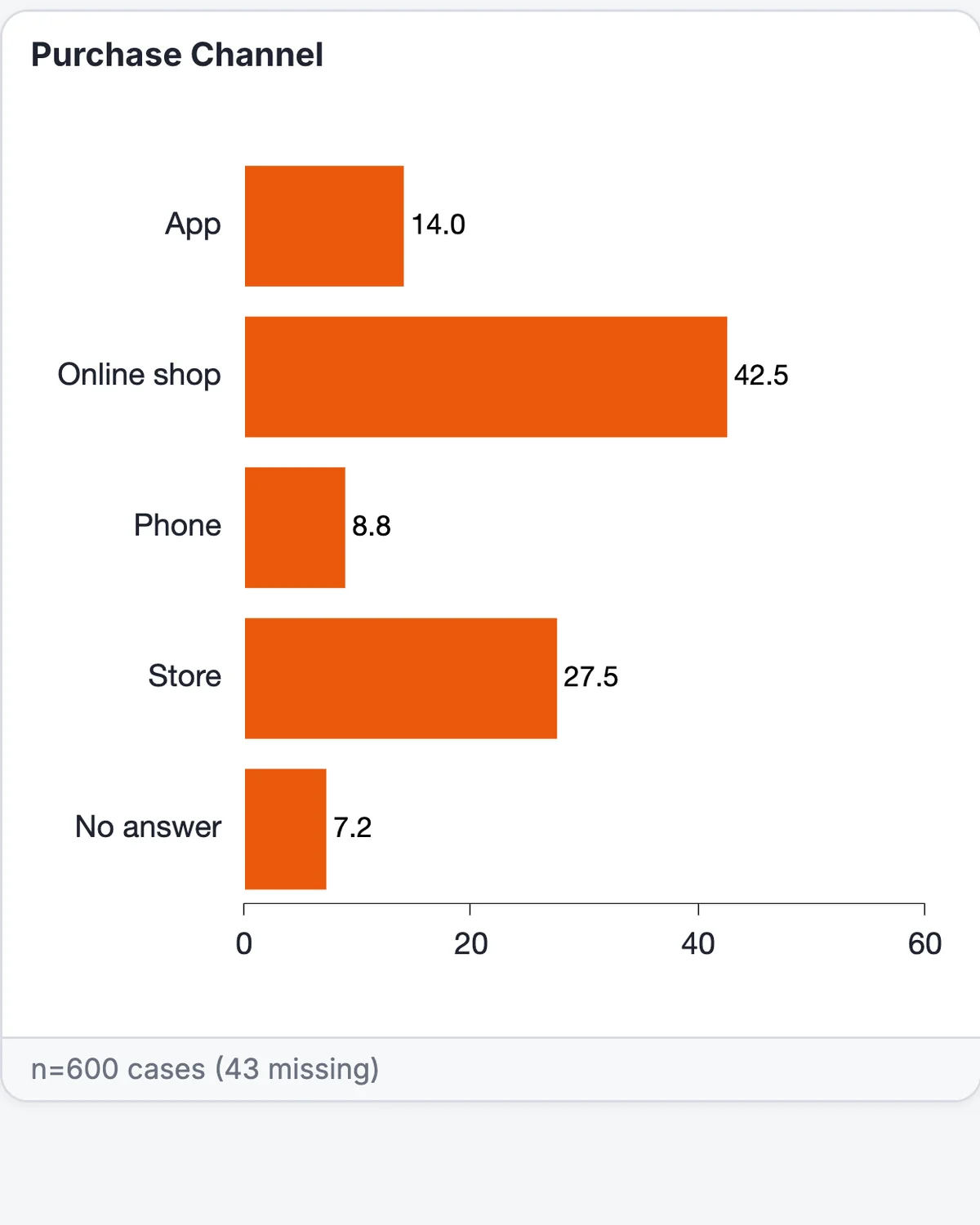
With Show missing values as their own category, readers see how many respondents gave no answer, instead of those cases quietly dropping out of the base.
- Missing values appear as a No answer bar at the end of the chart, even when the other bars are sorted. If there are no missing values, the bar doesn’t appear.
- Percentages then refer to all cases, including the missing ones.
- The footer shows the number of missing cases, for example “n=600 cases (43 missing)”. DataLion also shows this note when you exclude missing values.
- Excel and PowerPoint exports carry the bar and the footer note.
The category appears on simple charts of questions with answer categories. It doesn’t appear on mean and calculation charts, stacked charts with several items, or charts with custom SQL values.
For a single chart
Open the gear (Chart settings) on the chart, then Chart style… and the Advanced section. Under Missing values, choose:
- Use default: uses the project setting
- Exclude missing values
- Include missing values
- Show missing values as category
The value <empty> in the codebook
In the codebook you can label empty answers explicitly. Enter <empty> in the Value column of an answer option and give it a Label, such as “No answer” or “Not answered”. <empty> matches empty entries and NULL values. Upper and lower case don’t matter.
When DataLion generates a codebook automatically, it creates this answer option for empty text values itself and puts it at the end, see Generate a codebook automatically.
Check that every value is labelled
In the codebook editor, each question shows a percent icon on hover (Check answer option coverage). Click it to see how many data rows don’t match any answer option, for example “Uncovered: 12 of 600 rows (2 %)”. A green check means every value is covered. A yellow warning triangle means values are missing. Add answer options for them or label empty values with <empty>.
For numeric, text and SQL variables the check isn’t possible, and you see Coverage not available for this variable.
Settings in the codebook
In the codebook’s “Settings” column, you can add question-specific settings in curly braces. They override the project settings.
- Define missing values for this question:
{"na": "99"}, several values comma-separated in one string, for example{"na": "98,99"} - Exclude missing values:
{"exclude_na": true}. Values defined as missing don’t count toward the base for percentages. - Include missing values:
{"exclude_na": false}. Values defined as missing count toward the base for percentages.
Combine several settings with a comma, for example {"na": "99", "exclude_na": false}.

Tips
- Define missing values before you build dashboards. Changing them later shifts every percentage based on those questions.
- If figures differ between two analyses, different missing-value settings are a common cause.
- For answers like “don’t know”, you can also hide categories on the chart and remove them from the base.