
Multilingual surveys
A DataLion survey can run in several languages. You build the questionnaire once in the source language and add translations for questions, answer options, messages and buttons. Every language uses the same answer codes, so all responses land in one shared dataset and one dashboard.
Requirements
- DataLion release 2026.2.198 or later.
- An administrator account. Only administrators edit surveys.
- A survey in Draft status. Once published, languages and translations can no longer change, see What applies after publishing.
Enable languages
- Open the survey in the builder under Admin → Surveys.
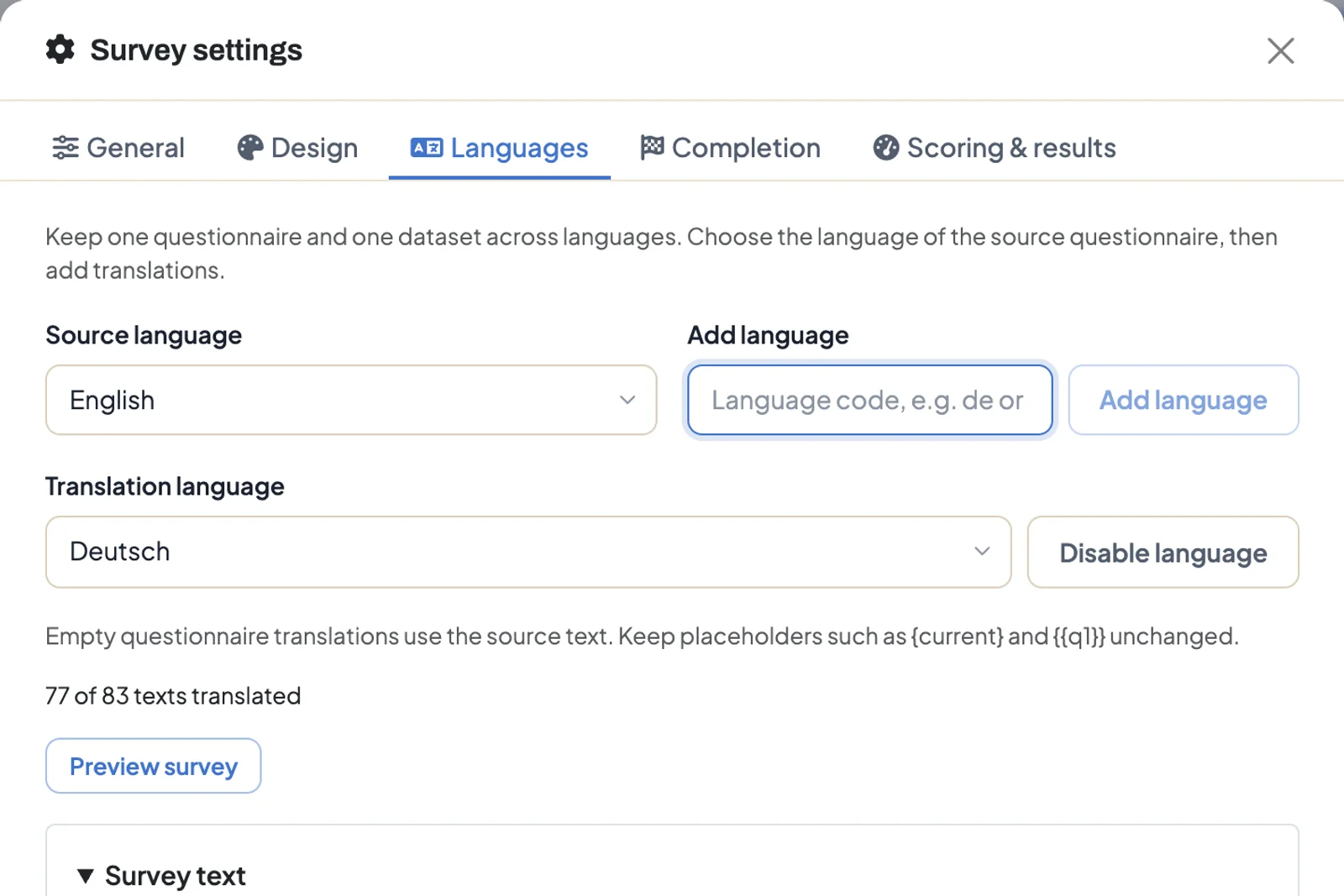
- Click Survey settings at the top and go to the Languages tab.
- Check the Source language. This is the language you wrote the questionnaire in.
- Type a language code under Add language and click Add language. As you type, DataLion suggests 26 common languages, among them German (
de), French (fr), Polish (pl) and Turkish (tr). Custom codes such aspt-brorde-chwork too. - Repeat for each further language.
Arabic, Hebrew, Persian and Urdu run right to left. Disable language removes a language from the survey. Its translations stay saved and come back if you add the language again.
Translate the questionnaire
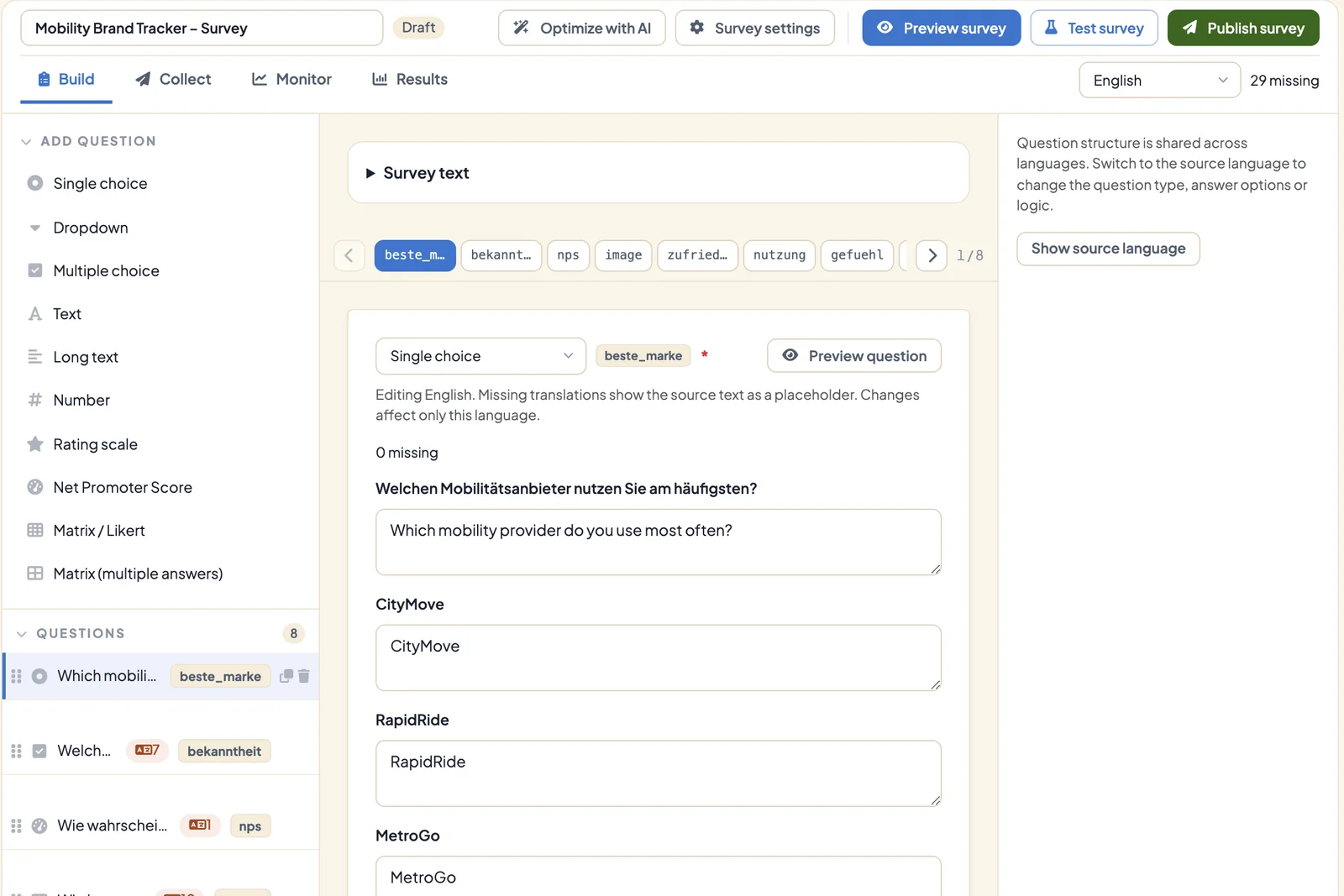
As soon as more than one language is enabled, the questionnaire language switcher appears in the builder, to the right of the Build, Collect, Monitor and Results tabs. Next to it, DataLion counts how many texts are still missing in that language, for example “29 missing”.
- Choose the language you want to translate in the switcher.
- Translation fields now appear under every question: question text, description, answer options, matrix rows and scale labels. Empty fields show the source text as a placeholder and carry the tag Translation missing.
- In the question list on the left, a tag on each question shows how many of its texts are still missing, so you find the gaps quickly.
- Open Survey text at the top to translate the title, description, welcome text, thank-you text and the screen-out and quota-full texts.
While you translate, the questionnaire structure is locked. Question type, answer options and logic apply to all languages and only change in the source language. Show source language switches back.
Keep placeholders such as {current} or {{q1}} unchanged in the translation, otherwise piped values stop working.
Translate buttons and messages
Buttons such as Next and Back, the page counter and messages such as “Please check the highlighted questions” are translated in the survey settings, not in the builder.
- Open Survey settings → Languages.
- Choose the language under Translation language.
- Expand Customize buttons and messages (optional) and enter the texts.
DataLion ships these texts for English, German, Spanish, French, Italian and Dutch. For other languages they appear in English until you translate them. The line ”… of … texts translated” shows the progress for the chosen language. Preview survey opens the preview in that language.
Which language respondents see
DataLion picks the language in this order:
- The language in the link, for example
https://<your DataLion address>/s/<survey>?lang=fr. - The language in which someone started the survey, when they resume it later.
- The browser’s language setting. A browser set to
de-ATgets the survey in German ifdeis enabled. - The source language if none of the others match.
With more than one language, respondents also see a Language menu at the top and can switch themselves. Switching doesn’t start a new response. Where a translation is missing, the source text appears.
The share dialog doesn’t create separate links per language. For an invitation in a particular language, append ?lang= and the language code to the survey link, as described in Distribute a survey.
Analysis in one dataset
The answer codes are the same in every language. Someone who picks “Très satisfait” in French gets the same code as someone who picks “Very satisfied” in English. All responses therefore sit in one dataset, and the results dashboard shows all languages together. DataLion stores the language each person used in the dataset column _language.
What applies after publishing
Publishing freezes the languages and translations. After that you can’t add or disable a language or change a translation. Check every language with Preview survey or Test survey beforehand.
Tips
- Translate once the questionnaire is final in the source language. New questions otherwise show up as missing translations in the other languages.
- There is no automatic translation for surveys. Translate the texts yourself, or have them translated and paste them in.
- Each text can hold up to 20,000 characters, and a questionnaire can have up to 100 languages.