
Distribute a survey: link, QR code and embedding
Once the questionnaire is ready, you publish it and get it to your respondents. DataLion offers a public link, a QR code, an embed code for your website and unique links for panels. In the survey settings you also decide whether responses stay anonymous, which URL parameters are stored, and where panel participants are sent at the end.
Requirements
- DataLion release 2026.2.192 or later. Allowed websites and auto-resize for embedding, and the choice between anonymous and personalized responses, arrived in 2026.2.197.
- An administrator account.
- A published survey. In the builder, click Publish survey and confirm with Publish now. Before that, Survey settings → General needs a Response retention (days) value. The default is 365 days.
Link and QR code
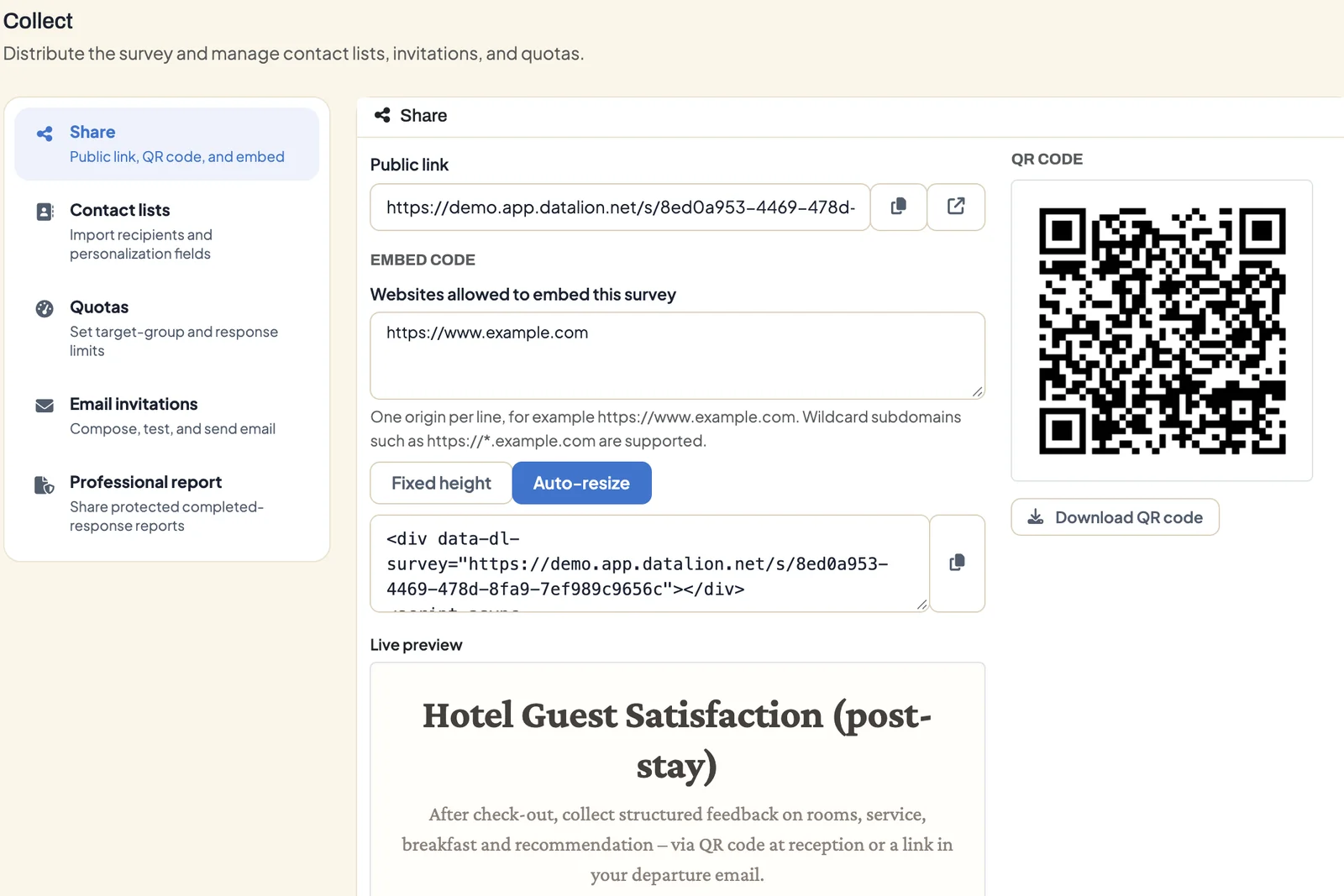
Open the survey under Admin → Surveys and switch to the Collect tab. The Share section is selected.
- Public link: the copy icon copies the survey address, the second icon opens it. Share the link by email, messenger, social media or on your intranet.
- Download QR code saves the QR code as a PNG file, for posters, table displays or invoices.
Participants don’t need an account. The survey runs in the browser, including on phones.
Embed on a website
Before the survey can appear on your website, you have to allow that website. The browser blocks every other site.
- Under Websites allowed to embed this survey, enter one address per line, for example
https://www.example.com. For all subdomains, writehttps://*.example.com. - Wait until the setting is saved. Until then, the embed code stays locked.
- Choose the kind of code:
- Auto-resize (default): the frame adjusts its height to each page of the questionnaire. The code consists of a
divand a small script. - Fixed height: a plain
iframe700 pixels high that you can adjust yourself
- Auto-resize (default): the frame adjusts its height to each page of the questionnaire. The code consists of a
- Copy the code with the copy icon and paste it into your page.
The Live preview shows how the embedded survey looks.
Unique links for panels and mailing lists
Under Unique links you create links that accept exactly one response each. Enter a value between 1 and 1,000 under Number of links and click Generate & download CSV. Load the CSV file into your mailing or panel tool.
To send the invitations straight from DataLion, with reminders and delivery status, use email invitations.
Capture URL parameters as variables
Append parameters to the link, such as ?source=newsletter&panel=4711, and DataLion stores the values in the dataset.
- Open Survey settings → General.
- Under Capture URL parameters, enter the names separated by commas, for example
source,panel.
In the dashboard you can then compare results by source or panel. In texts, insert the values as {{url_source}}, see Survey logic.
Anonymous or personalized
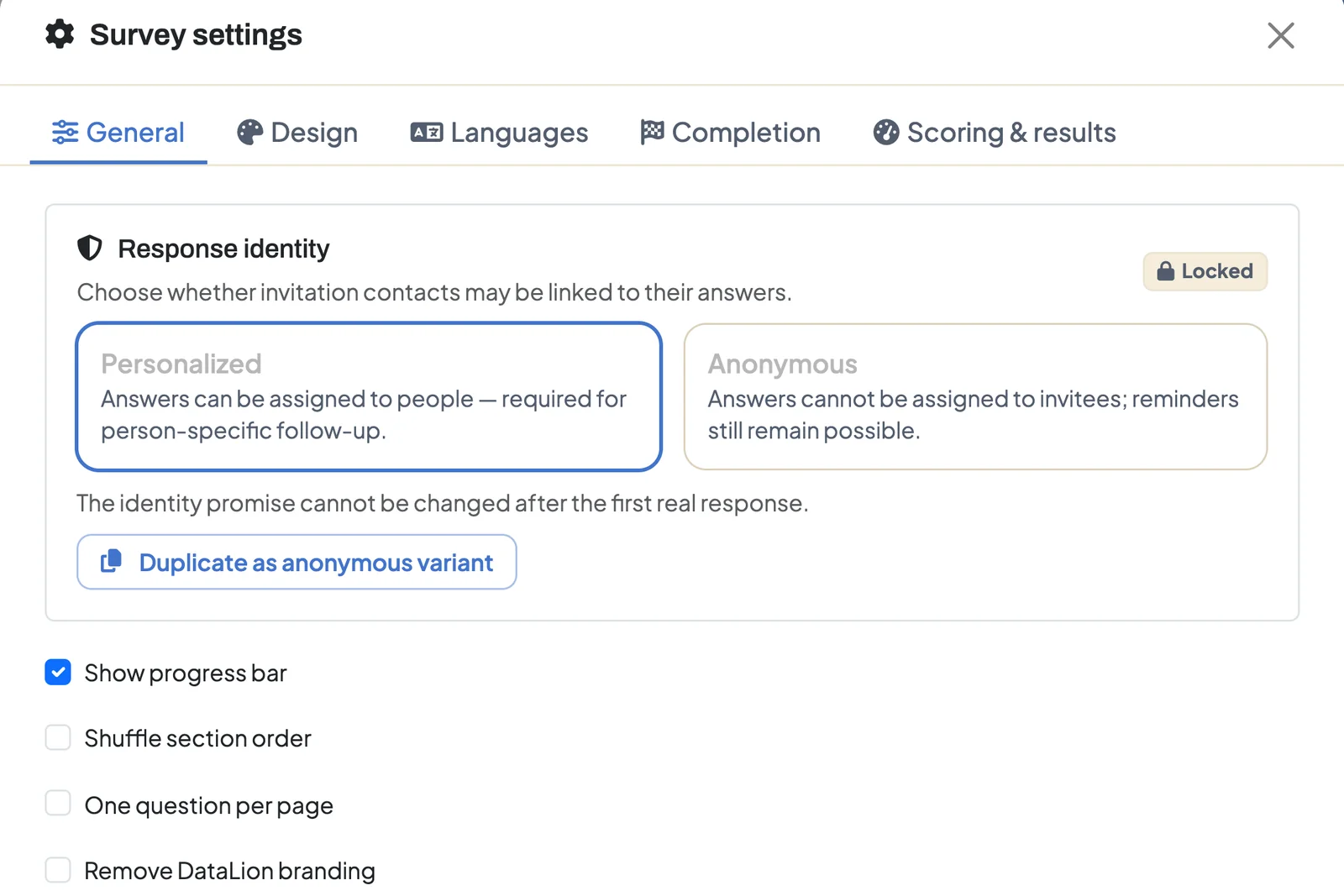
Under Survey settings → General → Response identity you decide whether responses may be linked to people.
- Personalized (default): responses from email invitations can be linked to the invited person. You need this for person-specific follow-up.
- Anonymous: DataLion separates invitations from responses. It doesn’t copy contact data or URL parameters into the dataset, and the Capture URL parameters field is disabled. Reminders to people who haven’t answered yet still work. Participants see a note that the survey is anonymous.
After the first real response, the choice is Locked. For an anonymous version of a personalized survey, click Duplicate as anonymous variant. DataLion then creates a new draft.
Redirects for panels
Under Survey settings → General → Completion redirects you enter addresses that replace the final message:
- Complete redirect URL
- Screen-out redirect URL
- Quota-full redirect URL
Insert captured URL parameters in curly braces, for example https://panel.example/complete?panelid={panelid}. That way the panel knows who completed.
Prevent repeat participation
Under Survey settings → General → Duplicate protection & access you’ll find these options:
- Allow repeat participation: for surveys the same person may fill in more than once, such as feedback after every visit
- Block another response in the same browser
- Hashed-network throttle in hours (0 = off): blocks further responses from the same network for the given time
- Access-code mode: No access code, One shared code or a Code list with one code per person
How many responses are accepted in total, and until when, is set with the response limit and close date, see Survey logic.
Tips
- Capture the source consistently with a URL parameter. The dashboard then shows straight away which channel brings the most responses.
- Decide before launch whether the survey runs anonymously, and say so in the invitation. After the first response it can’t be changed.
- DataLion only reports results from five unweighted cases per group. Smaller groups stay empty in the dashboard.
- What happens once responses come in is covered in From survey to live dashboard.