
Weight to the census
With census weighting, DataLion matches the age and gender mix of your sample to the adult population of a country. You map three fields, pick the country and apply the weights in one click. You don’t need a weighting file. How weights work in DataLion in general, for example with your own weight variable or a weights table, is covered in Weighting in DataLion.
Requirements
- DataLion release 2026.2.198 or later.
- An administrator account for the project.
- A unique respondent ID, an age field and a gender field in the dataset. Age can be stored in years or in age bands.
Set up census weighting
Under Admin → Projects, open the project and go to Weights in the project settings. The Census weighting box sits at the top.
- Click Set up census weighting.
- Choose the target country under Country. The list covers the 27 EU member states plus Australia, Canada, New Zealand, Norway, Switzerland, the United Kingdom and the United States.
- Choose the ID column under Unique respondent ID. DataLion suggests columns named
respondent_id,id,caseidorlfdnon its own. - Choose the Age field and the Age format:
- Age in completed years for whole numbers. DataLion puts each person into one of six bands: 18–24, 25–34, 35–44, 45–54, 55–64 and 65+.
- Age bands if your data already holds bands. Under Age bands in your data, enter the value your data stores for each of the six bands. Your bands must use exactly these limits.
- Choose the Gender field, then the stored codes under Male value and Female value. The lists show each value with its codebook label and case count.
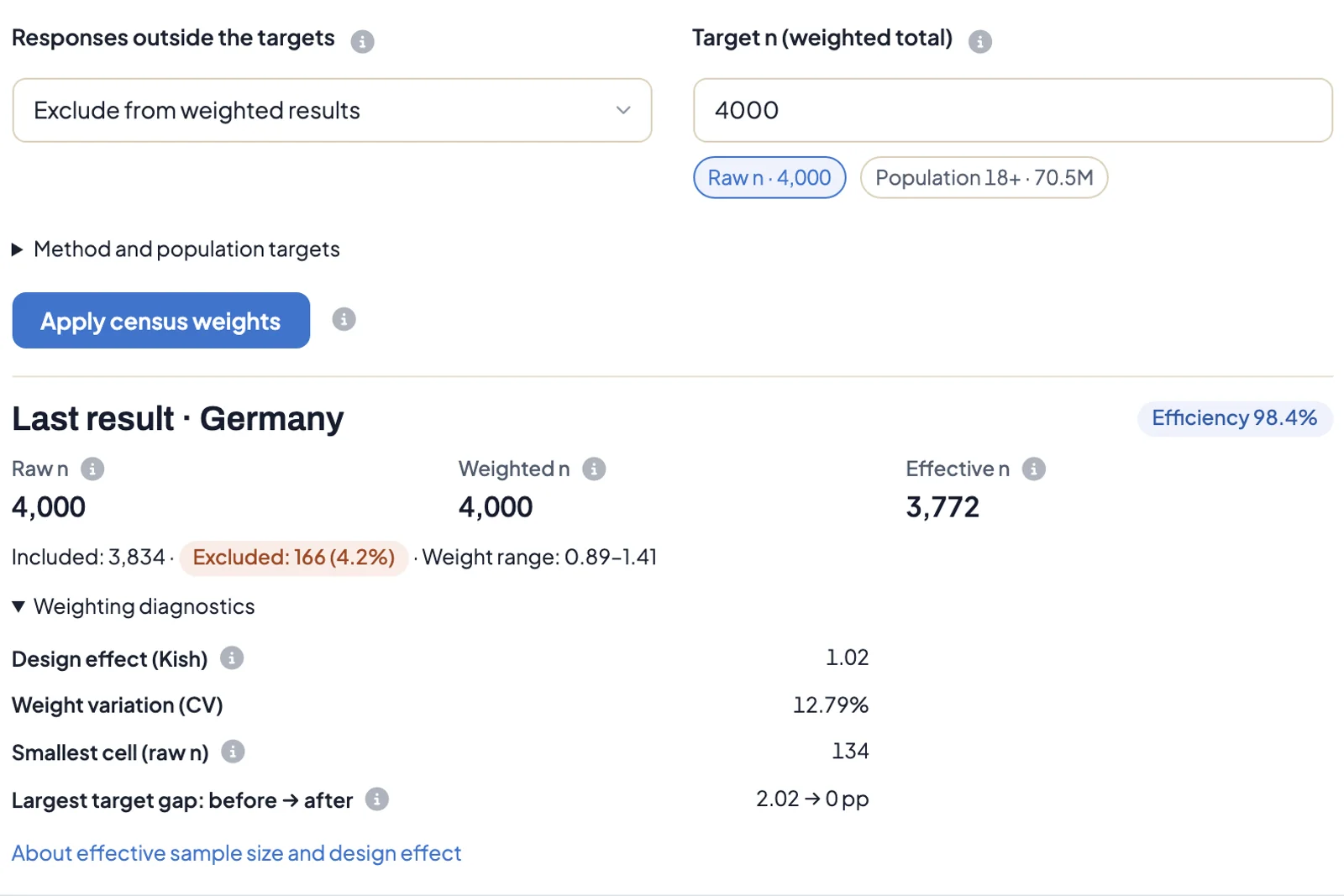
- Under Responses outside the targets, decide what happens to cases without a valid age or gender. The default is Exclude from weighted results: these cases get no weight but stay visible in unweighted results. With Stop if any response cannot be weighted, DataLion stops instead and leaves the existing weights unchanged.
- Check the Target n (weighted total), see the next section.
- Click Apply census weights.
DataLion saves the weights and switches them on for the project right away. There is no preview step. The weight legend then reads, for example, “Census weighting · DE · 2023”.
Choose the target n
The target n sets the total the weights add up to. Shares don’t change, only the weighted case counts.
- Raw n is the default. The weighted total then equals the number of interviews.
- Population 18+ projects to the adult population of the country, about 70.5 million for Germany. Weighted counts then read as people. DataLion checks the minimum case count against the raw n in this case.
- You can also type your own number, such as a company’s customer count.
Significance tests always use the raw n.
Read the result
After you apply the weights, Last result shows:
- Raw n: all cases, including excluded ones.
- Weighted n: the sum of the weights.
- Effective n: the case count an unweighted sample with the same precision would have, calculated after Kish.
- Efficiency: effective n divided by the number of included cases. Values close to 100% mean the weighting barely distorts the sample.
- Included, Excluded and Weight range with the smallest and largest weight.
Weighting diagnostics adds the Design effect (Kish), the Weight variation (CV), the Smallest cell (raw n) and the Largest target gap: before → after in percentage points. After weighting, the target gap should be 0.
A low efficiency or a wide weight range means some groups are badly underrepresented in the sample. The results are still correctly weighted, but they move around more. Check whether the sample is large enough for statements about that group.
Where the targets come from
The targets are the United Nations estimates of the population aged 18 and over at mid-2023 (World Population Prospects 2024), split by sex into six age bands. That makes twelve cells. Method and population targets shows the source and the target share of each cell for the chosen country.
DataLion weights by cell post-stratification: each person gets the target share of their cell divided by the cell’s share of the sample, scaled to the target n. Weights are not trimmed and missing values are not imputed.
Update the weights
The weights reflect the data at the moment you apply them. After a data update, click Apply census weights again. Uploaded weight files of the project are kept.
Refresh all stale target-group weights at once
Projects with filter-triggered weighting have a Target group weights panel in the Expert settings of the weights. It counts the target groups and shows how many are Current, Outdated or Broken. Update all outdated target groups recalculates every outdated and broken target group in the background, instead of one at a time. The button is only active when something is outdated and no run is in progress. Filter-triggered weighting doesn’t apply to census weights.
Troubleshooting
- “Weighting not possible: responses are missing for these population cells”. At least one of the twelve cells has no case, for example no men aged 65+. DataLion can’t merge cells. Weight with your own weighting script or weight variable instead, see Weighting in DataLion.
- Many cases are excluded. Check the male and female values and, with age bands, the values you entered. An age under 18 or over 120 is not weighted.
- The ID is rejected. The respondent ID must be filled and unique in every row. ID, age and gender must be three different columns.
- You want to remove the weighting. There is no dedicated switch. In the same section, clear the Weights field and set Separate weights table to No.