
Dashboard design
Dashboards in your corporate design
Bring dashboards and reports into your corporate identity — with ready-made themes, custom colors, free CSS and flexible layouts. Or simply describe your look in an AI prompt.
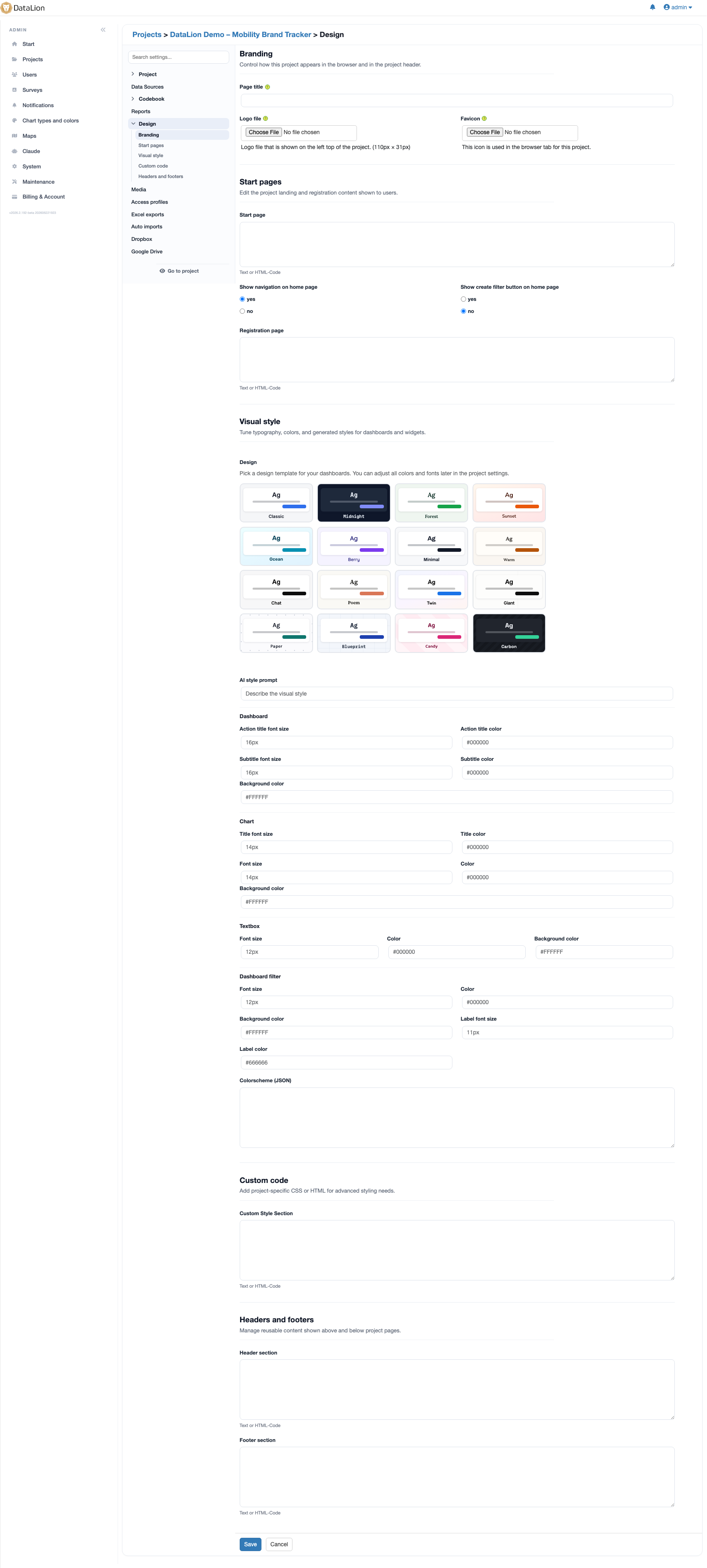
DataLion lets you style dashboards and reports fully in your corporate design: ready-made themes as a starting point, custom colors — including per variable — plus free CSS and flexible layouts. An AI style prompt turns a short description like "business-like dashboard with spring colors" into first color and font values.
- 🇩🇪 Made in Munich
- GDPR-compliant
- DPA included
- Hosted in Germany
- 🌐 Interface in EN, DE, FR, ES, IT & NL
Trusted by research institutes, brands & insights teams






- 50+ interactive chart types
- 20+ statistical methods
- SPSS · Excel · CSV import without data loss
- ISO 27001 certified data centers (Germany)
Ready-made themes, custom colors
Start from a ready-made theme and adapt it in the style generator: set background, headings, font sizes and colors for the dashboard, charts, text boxes and filters with no CSS — in RGB, HEX or by color name.
The color scheme defines which colors your charts use by default. You can even set colors per variable — so every answer category always shows in its own, recognizable color.
- Ready-made themes as a starting point
- Set colors & font sizes with no CSS
- Color scheme as the default chart palette
- Custom color schemes per question/variable
Describe your look — the AI gets started
You don't have to set every value by hand: type a prompt like "business-like dashboard with spring colors" into the AI style prompt field, and the AI generates the first color and font values from it.
The result is a starting point you then fine-tune by hand — ideal for getting from a blank page to a coherent first draft fast.
- Describe the look in plain language
- AI generates first color and font values
- Fine-tune the result by hand afterwards
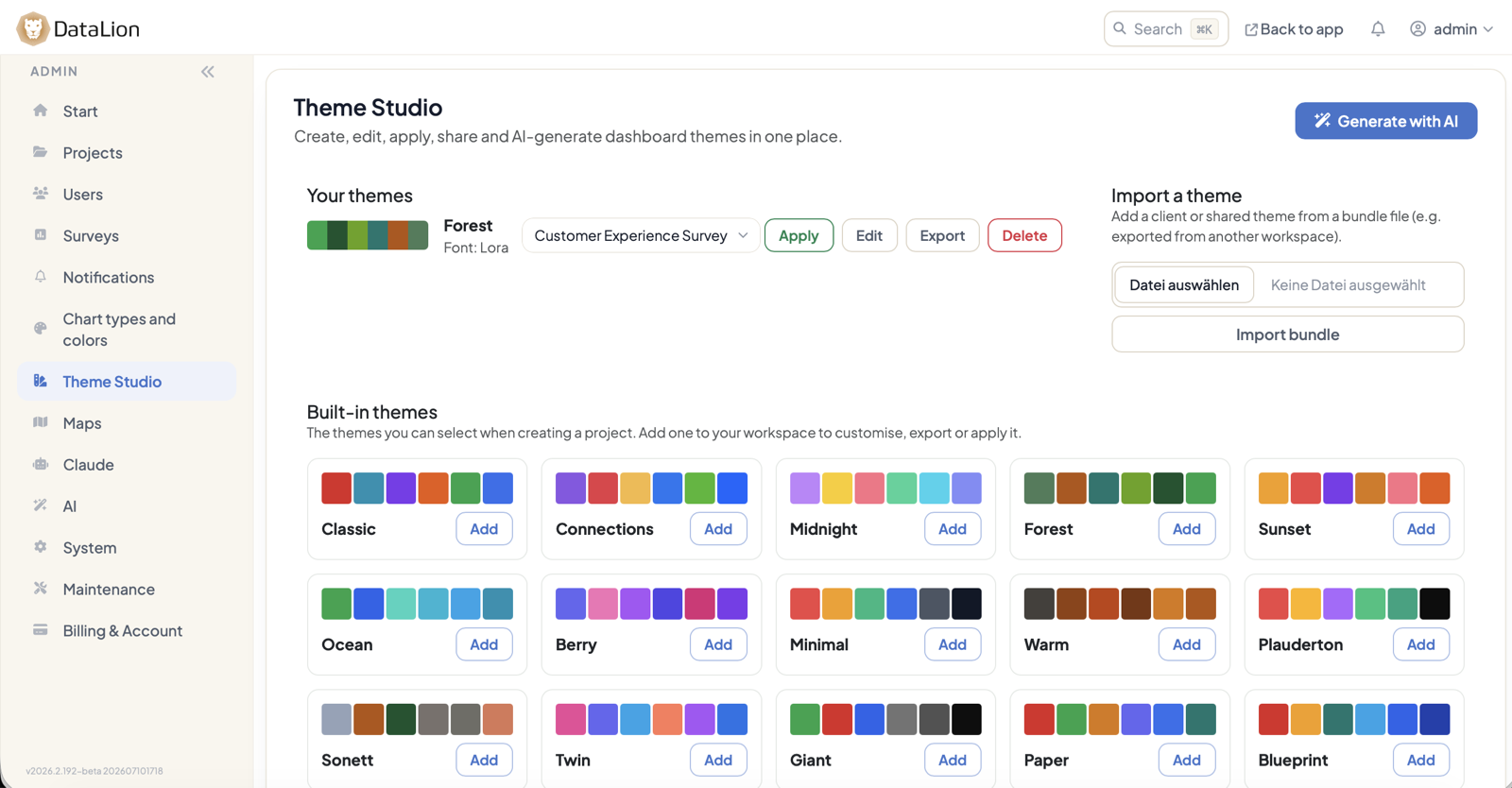
Free CSS & flexible layouts
When the brief has to be pixel-perfect, you take full control with CSS: custom themes, background images and layouts down to the detail. That turns dashboards and reports into consistently CI-compliant experiences — matching the native PowerPoint master used for export.
Who may edit the design is governed by roles & permissions. The dashboards themselves are built in the drag-and-drop builder.
See DataLion with your own data
Start free with your own raw data. Or book a personal demo of the path to a finished dashboard.
What users say about DataLion
- via G2
The embedding function allows us to generate insights of our data for our audience and customers by far less than half of the usual time needed before.
Verified user · Leisure, Travel & Tourism - via G2
User-friendliness, especially for market research topics. Structured backend with many customization options.
Verified user · Market Research - via G2
The contacts at DataLion are very committed. If you have problems, you can count on help. DataLion reacts quickly to requests for new functions.
Robert Q. · Managing Director - via G2
Very professional company, attentive to the customer needs, provider of a great software and service.
Generoso M. · CRM Analyst, Automotive

We now work much more efficiently, giving us more time to take care of the derivations and insights from the data for the customers.
More dashboard features
Common questions about design & themes
Can I match dashboards to my corporate design?
How does the AI style prompt work?
Can I set colors per variable?
Do I need CSS knowledge?
Does the design also apply to exported reports?
Bring your brand into the dashboard
Try DataLion free and explore the themes and the AI style prompt — or get a demo with your CI design set up live.