
Data preparation
Top and bottom boxes: computed before you ask
DataLion builds top-box, top-2, top-3 and the mirrored bottom scores for every scale question, automatically. Nothing to set up — you just click which box appears in your chart, table and export.
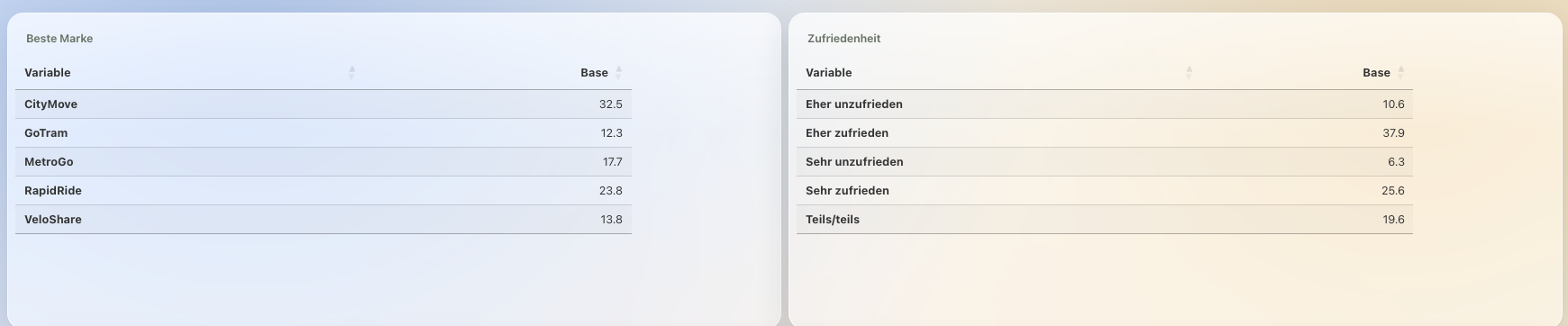
DataLion computes all six boxes for every scale question automatically: top-box, top-2, top-3, bottom-box, bottom-2 and bottom-3. There is nothing to define and no formula to write — one click picks which box appears in your chart, table and export. Because nothing is defined, every wave computes identically.
- 🇩🇪 Made in Munich
- GDPR-compliant
- DPA included
- Hosted in Germany
- 🌐 Interface in EN, DE, FR, ES, IT & NL
Trusted by research institutes, brands & insights teams






- 50+ interactive chart types
- 20+ statistical methods
- SPSS · Excel · CSV import without data loss
- ISO 27001 certified data centers (Germany)
Every top and bottom box is already there
As soon as a question is an ordered scale, DataLion builds top-box, top-2 and top-3 plus the mirrored bottom-box, bottom-2 and bottom-3 in a single pass — for every scale question in the dataset, with nothing for you to set up.
No code, no formula, no net row anyone has to configure per question. The scores are waiting before you first ask for them, together with their case numbers.
- Top-box, top-2 and top-3 for the upper end of the scale
- Bottom-box, bottom-2 and bottom-3 for the lower end
- Case numbers computed alongside each box
- Applies to every scale question — no setup
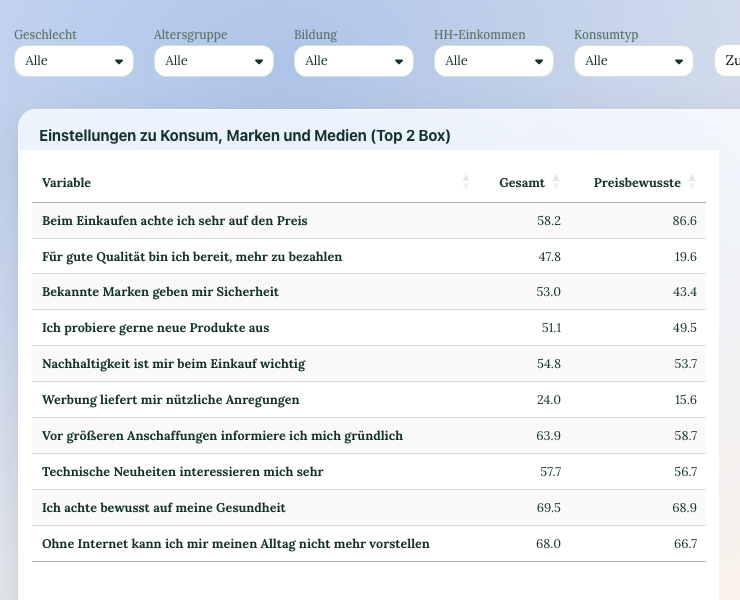
Switch, don’t recompute
The chart menu has a Top boxes entry: pick top-box, top-2, top-3, bottom-box, bottom-2, bottom-3 — or the full distribution. The table or chart updates immediately, with no recomputation and no second variable.
So nobody has to guess in the report, DataLion appends the chosen box to the title (“Satisfaction (Top 2 Box)”) and carries it into the header of the Excel export. You can set a project-wide default box, and if your scale runs the other way because 1 is the best value, you reverse the direction once for the whole project.
- Switch the box per chart and table with one click
- Chosen box shown in the chart title and Excel export
- Project-wide default box
- Scale direction reversible project-wide — raw data untouched
What is never defined can never drift
Because the boxes come out of the scale itself rather than out of a definition, every wave computes identically. There is no formula to forget when wave two is set up, and no colleague who draws “top-2” differently than you do.
The same holds across segments, sites and reports: the crosstab shows the same box as the dashboard and the PowerPoint. That keeps time series in tracking studies clean — right on the dataset, with no export to SPSS or Excel.
- Identical computation in every wave — without setup
- Same values in table, dashboard and export
- Clean time series for tracking studies
Custom net rows for anything beyond the boxes
Some nets are not a scale top but a substantive grouping: “all premium brands”, “digital vs. in-store channels”, a net on a different base. You add those in the codebook as their own category with a column and a condition — they then appear as an extra row in the table.
And when a metric needs to be computed rather than grouped — NPS, a top-box index across several questions, a sum score — you build it as a custom KPI in SQL, right in the codebook.
- Custom nets as their own codebook category
- Nets on a different base are possible
- Computed metrics such as NPS via SQL
See DataLion with your own data
Start free with your own raw data. Or book a personal demo of the path to a finished dashboard.
What users say about DataLion
- via G2
The embedding function allows us to generate insights of our data for our audience and customers by far less than half of the usual time needed before.
Verified user · Leisure, Travel & Tourism - via G2
User-friendliness, especially for market research topics. Structured backend with many customization options.
Verified user · Market Research - via G2
The contacts at DataLion are very committed. If you have problems, you can count on help. DataLion reacts quickly to requests for new functions.
Robert Q. · Managing Director - via G2
Very professional company, attentive to the customer needs, provider of a great software and service.
Generoso M. · CRM Analyst, Automotive

We now work much more efficiently, giving us more time to take care of the derivations and insights from the data for the customers.
More data preparation
Guides in the help center
Common questions about net and top-box scores
Do I have to set up top-box scores in DataLion?
Which boxes does DataLion compute?
Do top-box scores stay the same across multiple waves?
What if 1 is the best value on my scale?
Do I need SPSS or Excel for top-box scores?
Top-box scores without building them
Try DataLion free: upload scale data and top-box, top-2, top-3 and the bottom scores are already there — one click to switch, identical in every wave. Or book a demo.