
Create a survey from a template
A template saves you the blank page. DataLion ships more than 100 finished questionnaires, each in German and English. You pick a template, DataLion creates a draft from it, and you adapt the questions, design and logic to your project.
Requirements
- DataLion release 2026.2.192 or later.
- An administrator account. Only administrators create surveys.
Find a template
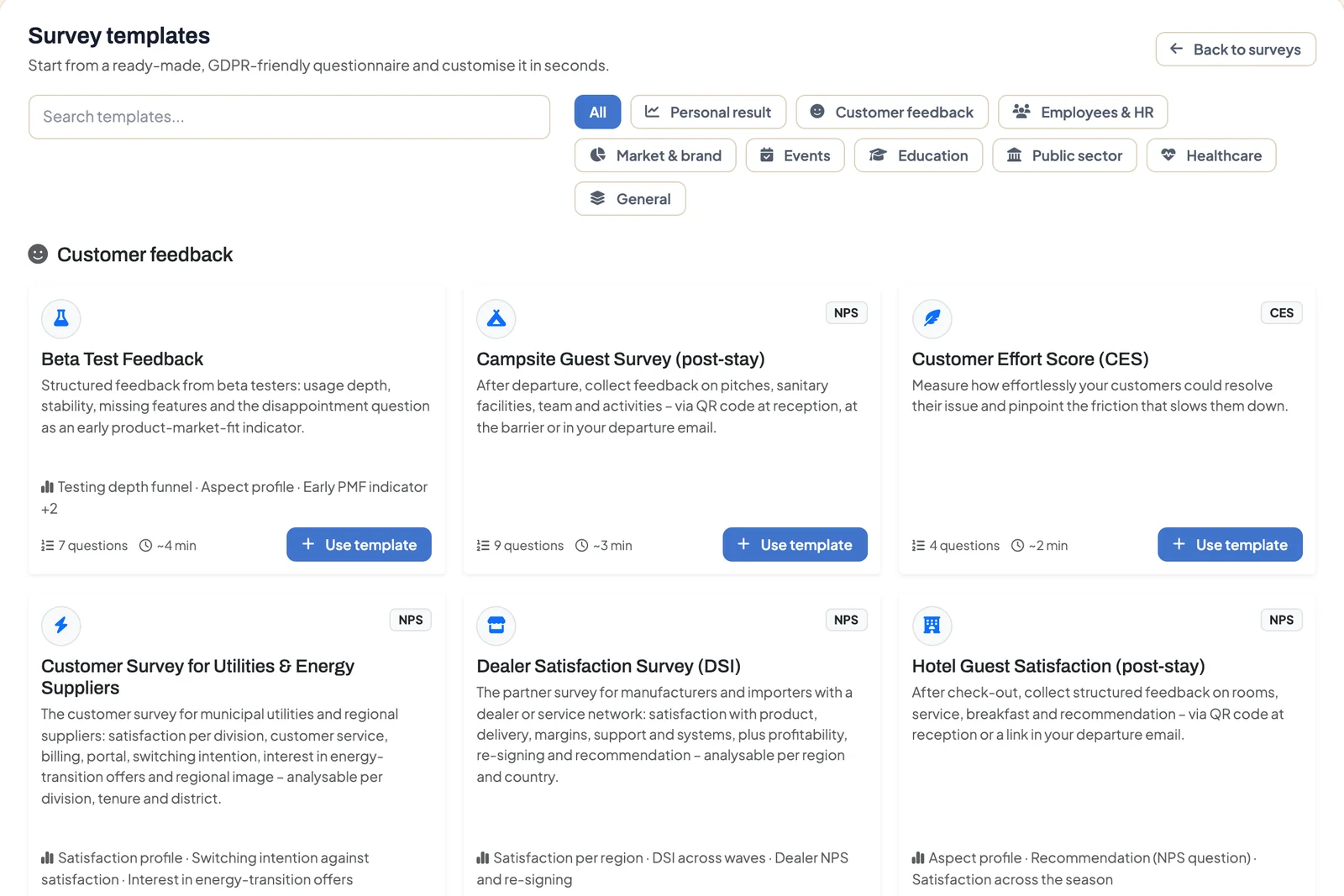
- Open Admin → Surveys and click From template. The Survey templates page opens.
- Type a keyword into Search templates…, for example “NPS”, “onboarding” or “patient”. The search covers title, description and metric.
- Or narrow the list with the filters: Customer feedback, Employees & HR, Market & brand, Events, Education, Public sector, Healthcare and General. Personal result shows the templates that give respondents an evaluation of their answers at the end.
Each card shows the number of questions, the estimated duration and, where there is one, the metric, such as NPS, CES or WHO-5. Other badges on the cards:
- Popular: frequently used templates
- Validated instrument: questionnaires from research with fixed wording, such as WHO-5 or the System Usability Scale
- Entertainment typology: just-for-fun self-tests without a scientific claim
Use the template
- Click Use template on the card.
- DataLion creates a draft in your interface language and opens it in the builder. The message reads Template loaded. Customise your survey and publish when ready.
- Adjust the title, questions and answers. Create a survey: the question types explains the builder.
- Check the design and the response retention period under Survey settings, then publish.
The template itself stays unchanged, so you can use it as often as you like.
What a template includes
- Questions with meaningful variable names, suitable question types and balanced scales
- A welcome text, a closing text and a matching design
- For templates marked Personal result: the score calculation and the result page as well, see Scored surveys and personal results
Publishing creates the project, dataset and codebook as with any survey, see From survey to live dashboard.
Tips
- Don’t change the wording or scales of validated instruments. Otherwise the results can no longer be compared with norm values or other studies. Add your own questions before or after them instead.
- The draft is created in your interface language. For a German version, switch the interface language and use the template again, or add more languages to the draft from release 2026.2.198.
- All templates with sample questions are also public under Survey templates.
- Instead of a template, you can also let AI draft a survey.